Algorithms
System Identification Regressor Local
\\
Use the System Identification algorithm to model both non-linear and linear relationships. In a typical use case you predict a number of target fields from their past values as well as from the past and current values of other feature fields. The System Identification algorithm is powered by a multi-layered, fully-connected neural network. System Identification supports incremental fit.
Note: The System Identification algorithm only works with numeric field values.
Parameters
-
The wildcard character is supported within target and feature fields.
-
Use the
dynamicsparameter to specify the amount of lag to be used for each variable.- The
dynamicsparameter is required. - Must be a list of non-negative integers separated by hyphens.
- The number of non-negative integers listed must equal the number of target variables plus the number of feature variables.
- The non-negative integers align with target and feature variables based on the order in which they are written.
- One dynamic value is matched with each wildcard and the same amount applies to all fields matched by that wildcard.
- The
-
The
conf_intervalparameter specifies the confidence interval percentage for the prediction.- Value must be between 1 and 99.
- A larger number means a greater tolerance for prediction uncertainty.
- Default value is 95.
- The
conf_intervalnumber used with thefitcommand does not need to be the same number used with theapplycommand.
-
The
layersoption specifies the number of hidden layers and their sizes in the neural network.- Must be a list of positive integers separated by hyphens.
- Option defaults to
64-64for two layers, each of a size of 64.
-
Use the
epochsoption to specify the number of iterations during training.- Must be a positive integer.
- Default value for
epochsis 500.
Syntax
| fit SystemIdentification <target-fields> from <feature-fields> dynamics=<int-int-...> [conf_interval=<int>] [layers=<int-int-...>] [epochs=<int>] [into <model-name>]
You can apply the saved model to new data with the apply command.
| apply <model-name> [conf_interval=<int>]
You can inspect the model learned by System Identification with the summary command.
| summary <model-name>
Syntax constraints
System identification cannot be used with K-fold cross validation.
Examples
The following example uses three lags of Expenses, two lags of HR1, two lags of HR2, and three lags of ERP.
| inputlookup app_usage.csv | fit SystemIdentification Expenses from HR1 HR2 ERP dynamics=3-2-2-3
The following example uses three lags of Expenses, two lags of all fields that starts with HR, and three lags of ERP.
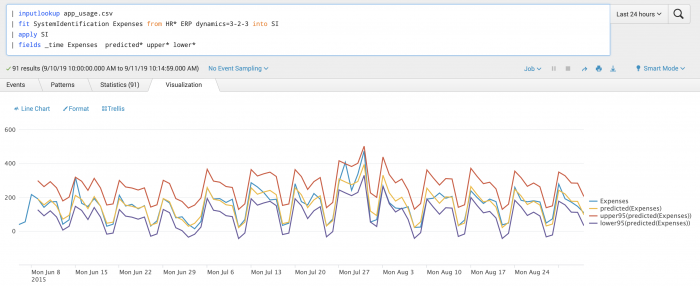
| inputlookup app_usage.csv | fit SystemIdentification Expenses from HR* ERP dynamics=3-2-3
The following example uses a fully-connected neural network with three hidden layers, each with a layer size of 64. The total number of layers in the neural network is five and comprised of one input layer, three hidden layers, and one output layer.
| inputlookup app_usage.csv | fit SystemIdentification Expenses from HR1 HR2 ERP dynamics=3-1-2-3 layers=64-64-64
The following example uses System Identification on a test set.
Local availability Permalink to this section
- Local class:
SystemIdentification - Source file:
Splunk_ML_Toolkit/bin/algos/SystemIdentification.py(in-repo pathSplunk_ML_Toolkit/bin/algos/SystemIdentification.py) - algos.conf stanza:
[SystemIdentification] - Class bases:
BaseAlgo
Source Permalink to this section
Adapted from the Splunk AI Toolkit 5.7.3 documentation at /en/splunk-cloud-platform/apply-machine-learning/use-ai-toolkit/5.7.3/algorithms-and-scoring-metrics-in-the-ai-toolkit/algorithms-in-the-ai-toolkit (section: regressor).